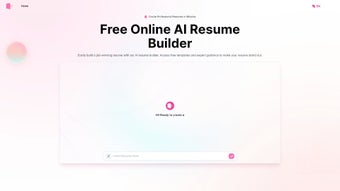

Download AIResumeBuilder – AI‑powered resume creator, free and secure
Overview
AIResumeBuilder is a full‑version web application designed to transform the way job seekers craft their professional profiles. Launched on Softonic on April 10th 2025, this AI‑text summarizer leverages advanced natural‑language processing to turn raw career data into concise, eye‑catching resumes in seconds. Whether you are a recent graduate, a mid‑career professional, or a senior executive, AIResumeBuilder adapts its tone, formatting, and keyword density to match the expectations of modern applicant‑tracking systems (ATS).
The platform runs entirely in the browser, eliminating the need for bulky installations while still providing a robust desktop‑like experience. Security is built‑in: all user data is encrypted in transit with HTTPS, and the service adheres to GDPR standards, ensuring that personal information stays private. The interface is clean, with drag‑and‑drop sections, real‑time preview, and one‑click export to PDF, Word, or plain‑text formats.
Because it is a web‑based tool, it works on any modern browser—including Internet Explorer, Firefox, Opera, Safari, and Chrome—making it accessible on Windows, macOS, Linux, and even mobile browsers. AIResumeBuilder also integrates with popular job boards, allowing users to push their newly generated resumes directly to LinkedIn, Indeed, or Glassdoor with minimal effort. The application’s AI engine continuously learns from millions of publicly available resumes, ensuring that the generated content reflects current industry trends and keyword strategies.
In short, AIResumeBuilder offers a free, secure, and constantly updated solution for anyone who wants a professional resume without hiring a costly writer.
Key Features & Installation Guide
Feature Highlights
- AI‑driven content generation that summarizes career history in under a minute.
- Customizable templates with over 20 modern designs, all responsive and ATS‑friendly.
- Real‑time keyword optimization based on the target industry and job description.
- One‑click export to PDF, DOCX, or plain text, preserving formatting across platforms.
- Secure cloud storage with end‑to‑end encryption; your data never leaves the browser unless you choose to save.
- Multi‑language support for English, Spanish, French, German, and Mandarin.
- Browser‑based operation—no download required; works on IE, Firefox, Opera, Safari, and Chrome.
- Integration with LinkedIn, Indeed, and Glassdoor for direct posting.
- Version history and undo/redo functionality for easy editing.
- Free tier with unlimited resume generations; premium upgrade unlocks advanced analytics.
Installation & First‑Time Use
Because AIResumeBuilder is a web application, installation is essentially a matter of visiting the official URL and creating an account. Follow these steps for a smooth start:
- Open your preferred browser. AIResumeBuilder supports Internet Explorer 11 and newer, as well as the latest versions of Firefox, Opera, Safari, and Chrome.
- Navigate to the official site. Enter
https://www.airesumebuilder.comand click the “Get Started” button. - Create an account. Provide a valid email address, choose a strong password, and verify your email through the confirmation link.
- Choose a template. After logging in, you’ll be presented with a gallery of templates. Select one that matches your industry or personal style.
- Enter your data. Use the guided wizard to input work experience, education, skills, and certifications. The AI engine will suggest phrasing and bullet points as you type.
- Optimize keywords. Paste the job description you’re targeting; AIResumeBuilder will highlight missing keywords and suggest improvements.
- Preview and export. Click “Preview” to see a live rendering. When satisfied, click “Export” and choose PDF, DOCX, or TXT.
- Save or share. Your resume can be saved to the cloud for future edits or shared directly to LinkedIn, Indeed, or Glassdoor via the integrated buttons.
The entire process takes less than ten minutes for a seasoned professional, and even first‑time users can produce a polished resume in under five minutes thanks to the AI guidance. Because no software is installed locally, updates are instantaneous—whenever the AI model receives improvements, they appear automatically the next time you log in.
Compatibility, Pros & Cons
Supported Operating Systems & Browsers
AIResumeBuilder runs on any device that can launch a modern web browser. Officially supported platforms include:
- Windows 10, 11 (IE 11+, Edge, Chrome, Firefox, Opera)
- macOS 12 Monterey and later (Safari, Chrome, Firefox)
- Linux distributions with recent versions of Chrome or Firefox
- iOS 14+ and Android 9+ (mobile browsers support full functionality, though PDF export works best on desktop)
This broad compatibility ensures that whether you’re on a corporate Windows workstation, a MacBook Pro, or a Chromebook in a co‑working space, AIResumeBuilder remains fully operational.
Pros
- Free and unlimited resume generation for all users.
- AI‑driven suggestions that keep content current and keyword‑rich.
- Browser‑only—no installations, instant updates.
- Secure cloud storage with GDPR compliance.
- Multi‑platform support across Windows, macOS, Linux, iOS, and Android.
- One‑click export to multiple formats without loss of design.
- Direct job‑board integration for streamlined applications.
Cons
- Advanced analytics and premium templates require a paid upgrade.
- Internet connection is mandatory; offline editing isn’t possible.
- Mobile browsers may have limited layout control compared to desktop.
- AI suggestions may need human tweaking for highly specialized roles.
- Support response times can vary during peak hiring seasons.
Frequently Asked Questions
Is AIResumeBuilder really free?
Yes, the core resume builder and all standard templates are completely free. A premium tier is available for users who want advanced analytics, custom branding, and priority support.
Do I need to install anything on my computer?
No. AIResumeBuilder is a web‑based service. You only need a modern browser with JavaScript enabled. All processing happens in the cloud.
How secure is my personal data?
All data transmitted between your browser and our servers is encrypted via HTTPS. We also store user data with AES‑256 encryption and comply with GDPR and CCPA regulations.
Can I export my resume to LinkedIn directly?
Yes. After finalizing your resume, click the LinkedIn button to import the PDF or copy the text into your LinkedIn profile with a single click.
What browsers are officially supported?
AIResumeBuilder works on Internet Explorer 11, the latest versions of Chrome, Firefox, Safari, and Opera. For the best experience, we recommend Chrome or Firefox.
Conclusion & Call to Action
AIResumeBuilder stands out as a powerful, free, and secure solution for anyone looking to craft a professional resume without the hassle of traditional desktop software. Its AI engine saves time, its browser‑only architecture eliminates compatibility headaches, and its GDPR‑compliant security gives peace of mind. Whether you’re applying for your first job or aiming for a C‑suite position, AIResumeBuilder provides the tools needed to present your experience in the most compelling way possible.
Ready to give your career a boost? Download AIResumeBuilder now, create a polished resume in minutes, and start applying with confidence. Join thousands of satisfied users who have already transformed their job search with AI‑enhanced precision.
Pros: Free core features, AI‑driven content, cross‑browser compatibility, secure cloud storage.
Cons: Premium tier required for advanced analytics, no offline mode, mobile layout limitations.



.png)



